
Visual Grader1.2 - App Store
You'll be able to see results in few seconds.
Publisher Description
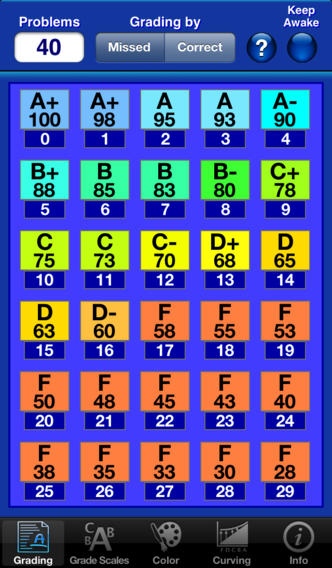
What is Visual Grader?
A tool for teachers to use for grading papers,
uniquely and carefully designed to provide a leisurely grading experience.
Now you can grade your papers anywhere --- in relaxing atmospheres.
In a Nutshell
Custom Grade Scales (any device supported alphabet)
Grade 1 to 4,000 questions or points.
Choose Rounding method (standard, scientific or bankers, ceiling, or floor)
Choose Grading (by problems missed or problems correct)
Choose colors used for Grade Results
Choose App Backgrounds
Grade the whole class with just 3 or 4 taps.
Easy to use ergonomic design
Monitors input to avoid errors
Complete info files online for thorough help
Localized help info for each view to assist understanding immediately
and specifically without searching for answers
Bonus points available
Grade curving is available if desired and allows several curving choices
(constant, linear, or quadratic) all available with a single tap.
Further curve tuning available with no mathematical understanding needed.
Multiple displayed sizes for grading results.
Choose the size that best fits the assignment being graded:
3 results sizes on (iPhone, iPod touch) and 4 results sizes on iPad.
Easy to view 'Grouped Layout' with Letter Grade, Percentage, and Problems (missed or correct) in a relaxing grouped layout to avoid tiresome eye scanning.
Grade most assignments with no scrolling.
Allows 'Grade Folding' for large assignments to reduce
scrolling to a maximum of 20 lines for up to 4,000 problems or points.
Can grade up to 4,000 problems or points on the iPad with NO scrolling.
Allow the screen to sleep or can lock on to keep it awake and active.
Even if locked awake, Visual Grader monitors and protects battery for you
by alerting low levels and unlocking to allow sleep as needed.
Additional features are available when run on the iPad.
Why Visual Grader?
Our products are intuitive to use and are visually helpful.
Most assignments can be graded with no scrolling, and only 3 or 4 taps total
(can grade any assignment up to 4,000 problems or points without scrolling on the iPad).
Visual Grader uses an ergonomic layout for ease of use and to facilitate understanding.
Visual Grader uses a unique Easy-View layout: color coordinated for relaxation.
And the Letter grades, percentage, and problems missed (or correct) are grouped
together: no tiresome eye scanning and scrolling is dramatically reduced or eliminated.
The Just Enough Principal of design is honored.
No confusing or needless features to get in the way;
and yet, every necessity is included.
Requires iOS 5.0 or later. Compatible with iPhone, iPad, and iPod touch.
About Visual Grader
The company that develops Visual Grader is David Smith. The latest version released by its developer is 1.2.
To install Visual Grader on your iOS device, just click the green Continue To App button above to start the installation process. The app is listed on our website since 2013-06-25 and was downloaded 0 times. We have already checked if the download link is safe, however for your own protection we recommend that you scan the downloaded app with your antivirus. Your antivirus may detect the Visual Grader as malware if the download link is broken.
How to install Visual Grader on your iOS device:
- Click on the Continue To App button on our website. This will redirect you to the App Store.
- Once the Visual Grader is shown in the iTunes listing of your iOS device, you can start its download and installation. Tap on the GET button to the right of the app to start downloading it.
- If you are not logged-in the iOS appstore app, you'll be prompted for your your Apple ID and/or password.
- After Visual Grader is downloaded, you'll see an INSTALL button to the right. Tap on it to start the actual installation of the iOS app.
- Once installation is finished you can tap on the OPEN button to start it. Its icon will also be added to your device home screen.
Program Details
System requirements
Download information
Pricing
Version History
version 1.2
posted on 2013-06-25
Disclaimer
Official App Store Link
We do not host Visual Grader on our servers. We did not scan it for viruses, adware, spyware or other type of malware. This app is hosted by Apple and passed their terms and conditions to be listed there. We recommend caution when installing it.
The App Store link for Visual Grader is provided to you by apps112.com without any warranties, representations or guarantees of any kind, so access it at your own risk.
If you have questions regarding this particular app contact the publisher directly. For questions about the functionalities of apps112.com contact us.
